Table of contents
About this gameScreens
Miscellaneous
About this game
Basic rules
Your goal is to make matches of three or more of same number blocks in row or column.
You can change the number with block in the following operations.
When you do the operation, the stock of blocks will decrease.
You can cancel the operation to click the block which selected first.
If the sum is greater than 9, the tens digit will be dropped.
The zero block matches with anything.
You can change the number with block in the following operations.
1.Select one of the block on the grid.
2.Move it into an adjacent block.
3.The two numbers are added together, and the block at the head of the block queue appears in the vacant space.
Every controls are done with the mouse.2.Move it into an adjacent block.
3.The two numbers are added together, and the block at the head of the block queue appears in the vacant space.

When you do the operation, the stock of blocks will decrease.
You can cancel the operation to click the block which selected first.
If the sum is greater than 9, the tens digit will be dropped.
The zero block matches with anything.
Kind of blocks

The colorful blocks with numbers.

The gray blocks with numbers.
It keeps the same number when

The block with a circle of surrounding arrows.
Its number is increment every turn.

This block cannot select.
It is removed by making a nearby match, and you will get some bonus.

The block which froze. It is thawed by making a nearby match.
top
Screens
Title screen
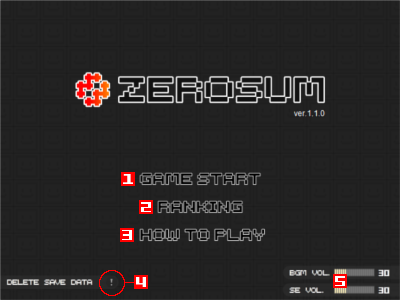
1."GAME START" button
Click to start the game.
2."RANKING" button
Click to show Ranking screen.
3."HOW TO PLAY" button
Click to open "How to play" window.
4."DELETE SAVE DATA" button
Click to delete local saved game data.
5.BGM/SE volume
top
Game screen
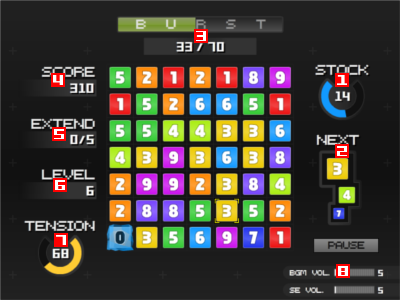
1.Stock meter
This shows the stock of blocks.
When you run out the stock, the game is over.
The rounded bar will show you the remaining time until the stock decrease.
When the remaining time reaches zero or you make matches, the stock will decrease and the remaining time will be reset.
When you run out the stock, the game is over.
The rounded bar will show you the remaining time until the stock decrease.
When the remaining time reaches zero or you make matches, the stock will decrease and the remaining time will be reset.
2.Block queue
This shows blocks which fill the vacant space after moving a block.
3.Burst meter
This shows the values required to start the "Burst Mode ", which is a kind of bonus round.
Every time you make matches, the number of blocks will add to the left-side value.
When the left-side value reaches to the right-side value, Burst Mode begin.
During Burst Mode, matches can form with any combination of connected blocks, not just ones in a straight line.
Every time you make matches, the number of blocks will add to the left-side value.
When the left-side value reaches to the right-side value, Burst Mode begin.
During Burst Mode, matches can form with any combination of connected blocks, not just ones in a straight line.
4.Score meter
This shows total points that you earned.
5.Extend meter
This shows the number of blocks to extend.
Each time that meter reaches zero, your stock increases.
Each time that meter reaches zero, your stock increases.
6.Level meter
This shows your current level.
Whenever you make matches, your level will increase.
Whenever you make matches, your level will increase.
7.Tension meter
This shows your current "Tension".
This value represents the probability of appearance of blocks.
The probability becomes maximum when Tension is 100%.
This value represents the probability of appearance of blocks.
The probability becomes maximum when Tension is 100%.
8.Buttons
top
Ranking screen
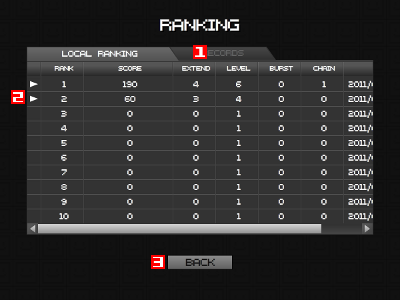
1.Menu tab
2.Replay button
Click to start playing the replay.
3.Back button
Click to back to the title screen.
top
Replay screen
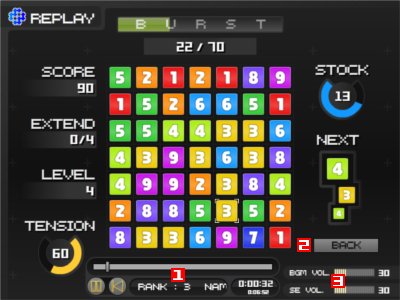
1.Control panel
2.Back button
Click to back to the previous screen.
3.BGM/SE volume
top
Miscellaneous
Scoring
Points by making matches are calcurate the formula;
Points = 10 * Level * 2ˆ(The number of matches - 3) * Chains
Disclaimer
Author disclaims any warranties for this game and this manual.
top